One Toolset, Two Ways to Bring AI to Your Data
QuantumLayers already makes data ingestion, merging, visualization, and AI interpretation effortless. Now there are two ways to drive it with AI. QL-Agent lives inside QuantumLayers – describe what you want and it orchestrates every action for you. The QL MCP Server flips the direction, exposing the exact same functions to the AI client you already use, so your assistant can connect sources, write queries, build charts, generate insights, and schedule reports on your behalf. Same tools. Same results in the same workspace. You choose where the conversation happens.
QL-AGENT
AI inside QuantumLayers
A conversational analyst built into the QuantumLayers app. Type a request and it orchestrates every platform function on your behalf – no context switching, no setup, no code. Best when QuantumLayers is where your work already lives.
QL MCP SERVER
QuantumLayers inside your AI
An endpoint built on the Model Context Protocol that exposes every QuantumLayers tool to Claude, Cursor, and other MCP clients. Bring your data pipeline into the AI you already use. Best when you want QL tools alongside everything else your assistant can do.
QL-Agent: From Prompt to Production, In Seconds
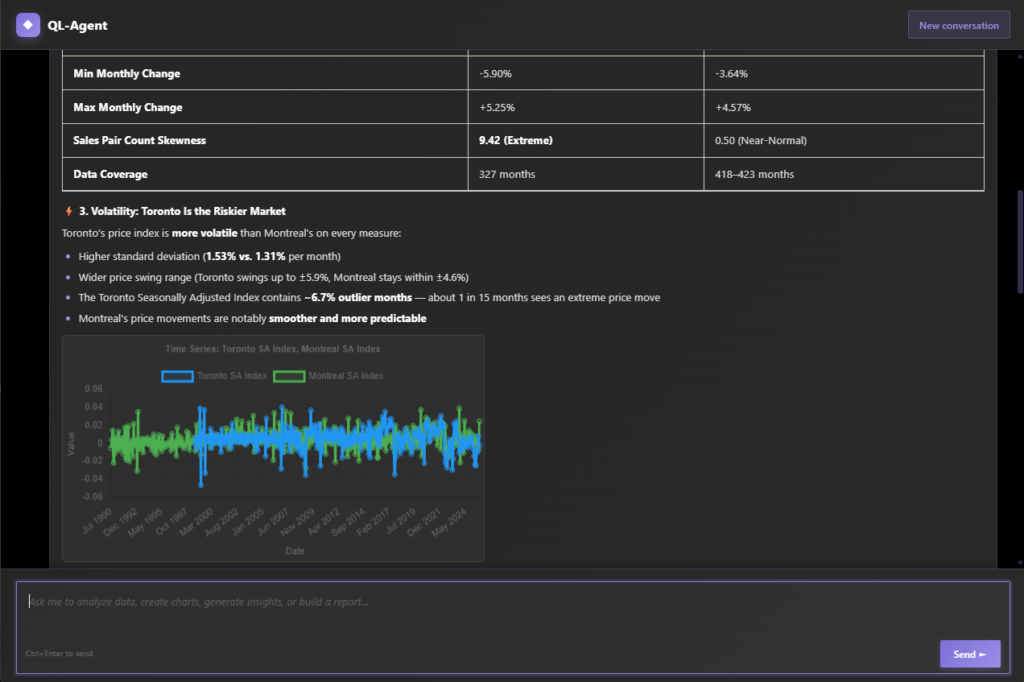
Describe what you want in plain English, and QL-Agent handles every step inside QuantumLayers – connecting sources, writing queries, building charts, generating insights, and scheduling reports on your behalf.
The Same QL Tools Power Both
Every core QuantumLayers function is available to both QL-Agent and the QL MCP Server. Whichever surface you use, the AI doesn’t just answer questions about your data – it takes action on your behalf.
CONNECT
Connect any data source
Ask for a MySQL database, a REST API, an SFTP server, a Google Sheet, or a CSV from a URL. QL handles the configuration, tests the connection, and creates the dataset – whether the request comes from QL-Agent or your own MCP client.
QUERY
Generate SQL from plain English
Describe the data you need – “all completed orders from the last 6 months grouped by region” – and QL connects to your database, reads the schema, writes the SQL, and creates the dataset automatically.
MERGE
Merge datasets across sources
Combine your CRM export with your order database. QL identifies the join columns, selects the right join type, and produces a unified dataset – no schema alignment required from you.
VISUALIZE
Build & save visualizations
Ask for “a scatter plot of revenue vs. acquisition cost” and QL analyzes the dataset, recommends the best chart types, generates the visualization, and saves it to your dashboard – ready to embed in reports.
ANALYZE
Generate AI insights & statistics
Ask “what patterns exist in my sales data?” and QL runs correlation analysis, ANOVA tests, trend detection, and outlier identification, then translates the statistical findings into plain-language business recommendations.
AUTOMATE
Schedule automated reports
Ask for “a weekly report every Monday with insights and charts from my sales dataset”, and QL creates the report, assigns the frequency, attaches your saved charts and AI analysis, and delivers it by email in HTML or PDF.
How QL-Agent Works
A conversational assistant inside QuantumLayers with direct access to every function – dataset creation, merging, visualization, statistical analysis, AI insights, and report scheduling – orchestrating them autonomously from what you ask.
STEP ONE
Describe your goal
Type a request in natural language. QL-Agent understands complex, multi-step instructions, from “connect my PostgreSQL database and show me monthly revenue trends” to “create a weekly report for my three latest datasets.”
STEP TWO
QL-Agent executes
The agent breaks your request into individual actions – connecting data sources, writing queries, generating charts, running statistical tests – and executes each one in sequence. If it needs more information, it asks before proceeding.
STEP THREE
Review your results
QL-Agent summarizes what it did and delivers the results – new datasets appear in your dashboard, charts are saved and ready to use, insights are generated, and reports are scheduled. Everything lives in your existing QuantumLayers workspace.
The QL MCP Server: Bring QuantumLayers Into Your AI
The Model Context Protocol is an open standard for connecting AI assistants to external tools. The QL MCP Server exposes every QuantumLayers function as a native tool, so the AI client you already use can build datasets, run analysis, and schedule reports directly – no copy-paste, no switching apps.
STEP ONE
Add the server
Point your MCP client at the QuantumLayers server URL and authenticate with your account. Claude, Claude Code, Cursor, and any MCP-compatible client can connect in under a minute.
https://quantumlayers.com/wp-json/ql/v1/mcp
STEP TWO
Tools appear automatically
Your AI client discovers every QuantumLayers function as a native tool – dataset creation, SQL generation, merging, visualization, statistics, insights, and report scheduling – with no extra configuration.
STEP THREE
Work from your own AI
Ask your assistant to build datasets, run analysis, or schedule reports. It calls QuantumLayers directly, and the results land in your workspace – right alongside everything QL-Agent produces.
Example Prompts
The same prompts work in QL-Agent and in any MCP client connected to the QL server. From simple one-step tasks to complex multi-step workflows.
| What you say | What QL does |
|---|---|
| “Connect to my PostgreSQL database at db.mycompany.com and pull all orders from the last 12 months.” | Extracts the schema, generates the SQL query, creates the dataset, and triggers processing. |
| “What are the key trends in my Sales Q4 dataset?” | Runs statistical summary, correlation matrix, ANOVA analysis, and generates AI-powered business insights. |
| “Create a bar chart comparing revenue by product category and save it.” | Analyzes the dataset columns, builds the chart with the right parameters, and saves it to your dashboard. |
| “Merge my Customer List and Order History datasets on customer_id.” | Identifies the join column, performs a left join, and creates a new unified dataset. |
| “Set up a weekly report every Monday at 9 AM with insights and charts from my three sales datasets, sent to team@mycompany.com.” | Creates a scheduled report, assigns frequency and timezone, attaches datasets and saved charts, and configures email delivery. |
| “Import this CSV from https://data.example.com/export.csv and show me the best visualizations for it.” | Downloads the file, creates the dataset, runs chart recommendations, and generates the top visualizations. |
QL-Agent vs. QL MCP Server
Same tools, same results in the same workspace. The only difference is where the conversation happens.
| QL-Agent | QL MCP Server | |
|---|---|---|
| Where it runs | Inside the QuantumLayers app | Inside your own AI client |
| How you access it | Chat panel in QuantumLayers | Claude, Claude Code, Cursor, any MCP client |
| Setup | None – built in | Add the server URL once |
| Best for | Working entirely in QuantumLayers | Combining QL tools with your existing AI workflow |
| Tools available | All QuantumLayers functions | The same QuantumLayers functions |
| Results appear in | Your QuantumLayers workspace | Your QuantumLayers workspace |
Frequently Asked Questions
QL-Agent is an AI-powered conversational assistant built into QuantumLayers. It lets you automate the entire analytics workflow – from dataset creation and SQL query generation to visualization, statistical analysis, AI insights, and report scheduling – through natural language prompts instead of manual configuration.
The QL MCP Server is an endpoint built on the Model Context Protocol, an open standard for connecting AI assistants to external tools. It exposes every QuantumLayers function – dataset creation, SQL generation, merging, visualization, statistics, insights, and report scheduling – so any MCP-compatible AI client can use them directly.
They use the same underlying tools in opposite directions. QL-Agent puts an AI assistant inside QuantumLayers; the QL MCP Server puts QuantumLayers tools inside your own AI client. Results from both appear in the same QuantumLayers workspace.
Any client that supports the Model Context Protocol, including Claude, Claude Code, Cursor, and a growing list of MCP-compatible tools. You add the QuantumLayers server URL to your client and authenticate with your account.
No. Both work through plain English – so whether you’re a data scientist who wants to move faster or a business lead who just needs answers, the interface gets out of your way. Describe what you need, for example “connect to my PostgreSQL database and show me revenue trends”, and QL handles the SQL, configuration, and analysis automatically. QL-Agent needs no setup; the MCP Server only requires adding the server URL to your AI client once.
Both QL-Agent and the QL MCP Server can connect to all data sources supported by QuantumLayers: MySQL, PostgreSQL, and SQL Server databases, REST APIs with JSON responses, SFTP servers, Google Sheets, and CSV files from public URLs.
QL-Agent and the QL MCP Server are available on all plans with a monthly AI token budget. Free tier users can try both with limited usage. Pro subscribers get a significantly higher token budget for heavier workflows.
Learn More
The platform in full, both AI surfaces up close, and the resources to go deeper.